TL;DR
Atlas now gives traders a cleaner research loop: shareable chats and strategies, compare mode, strategy-quality diagnostics, a clearer TradingView handoff, smarter prompts and filters, stronger session controls, and more realistic backtest review.
The practical benefit is continuity. You can find a candidate, inspect the quality signals, compare it against another setup, share the context, and move the strategy toward TradingView without rebuilding the same research path from scratch.
Cleaner strategy result cards put the next action closer
Atlas strategy result cards now make the core research surface easier to scan: performance metrics, the equity chart, quality signals, and follow-up actions all sit close to the result.
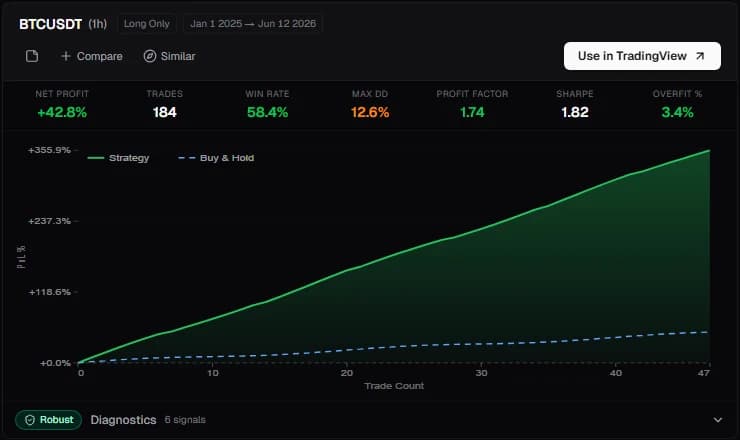
The result card is where most Atlas workflows branch. You can compare the strategy against another candidate, find similar setups, inspect diagnostics, or move the strategy toward TradingView. The equity chart also shows the full backtest range, which gives a better view of whether performance was steady or concentrated in a narrow period.
Share Atlas research without losing context
Atlas chats and strategies can now be shared through public preview links. Instead of sending a static screenshot or asking someone to recreate your prompt chain, you can share the research context itself.
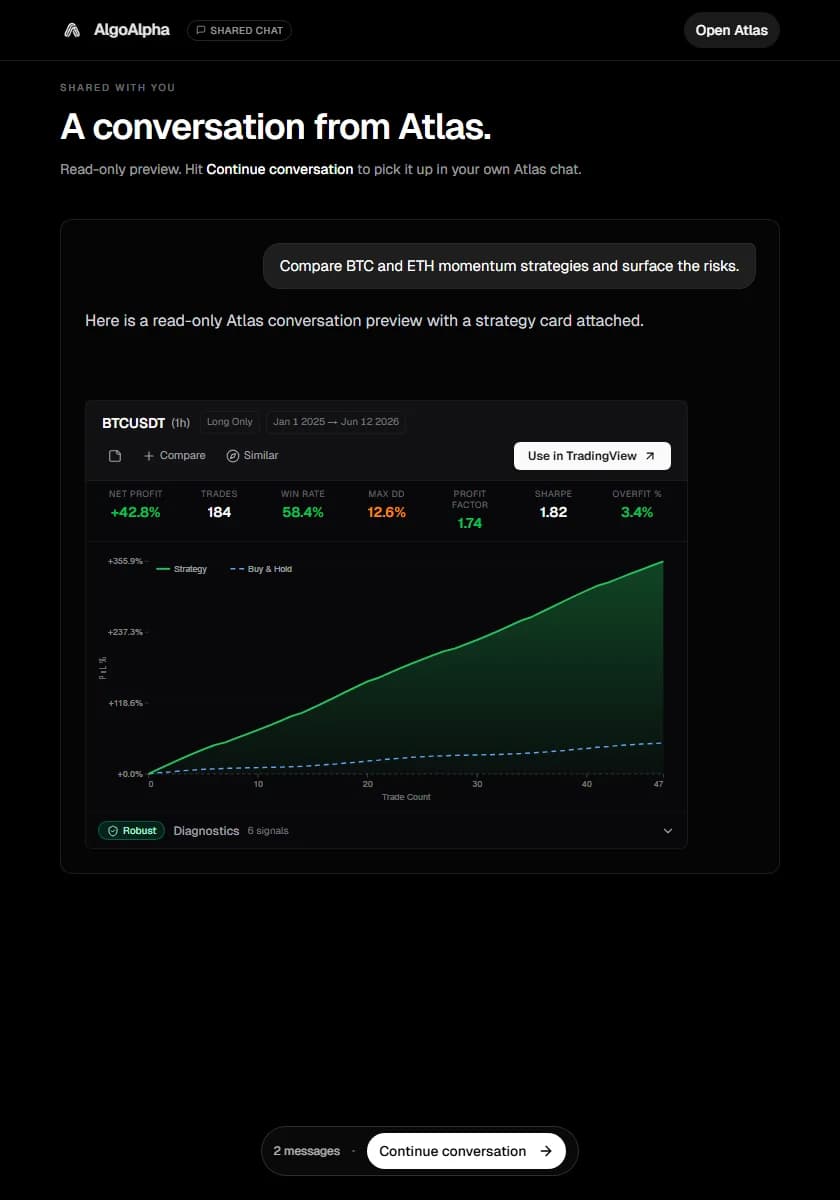
Recipients can review the shared conversation in a read-only preview and use Continue conversation to fork the context into their own Atlas flow. That makes collaboration more practical for trading teams, Discord groups, mentors, or anyone who wants a second opinion on a strategy idea.
Use shared Atlas previews when you want to:
- Show the exact research path that produced a strategy candidate.
- Let another trader continue from the same context instead of starting over.
- Share a strategy discussion while keeping the next step inside Atlas.
- Keep strategy review focused on the actual prompt, result, and follow-up path.
Compare mode makes strategy shortlists easier to judge
Compare mode is built for the point where two strategies both look viable but the tradeoff is not obvious.
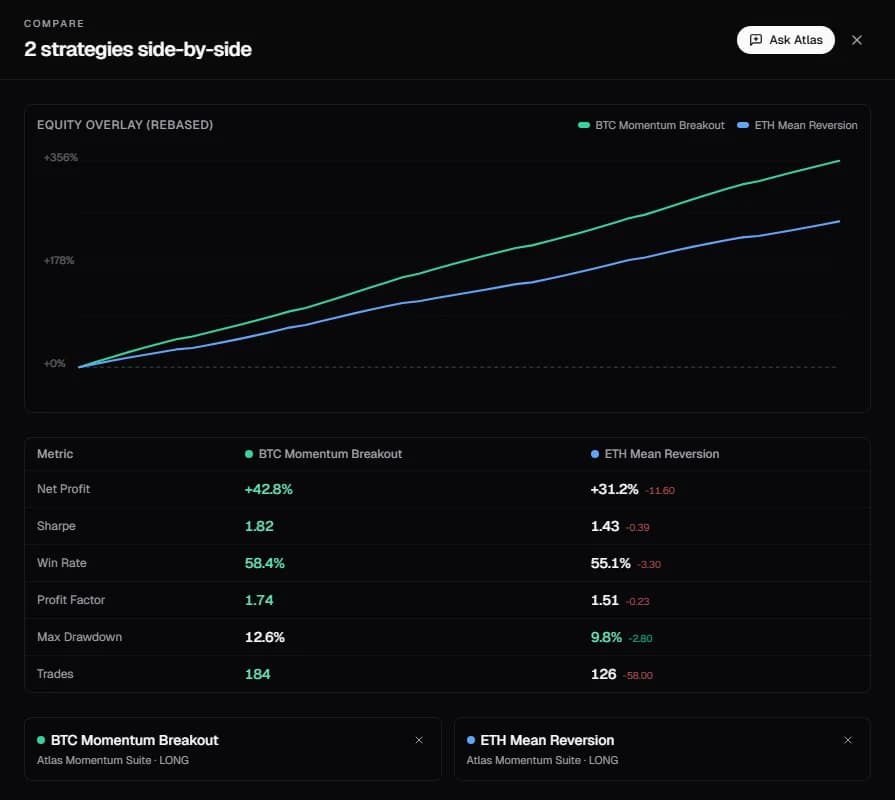
The compare sheet brings the important differences into one view:
- Overlaid equity curves show whether returns arrived smoothly, unevenly, or in different market phases.
- Side-by-side metrics make net profit, drawdown, Sharpe, win rate, profit factor, and trade count easier to scan together.
- Best-value highlighting points out which candidate leads on each metric.
- The Ask Atlas action gives you a direct follow-up path when you want an interpretation of the comparison.
That last step matters. A metric matrix can show that one strategy has a stronger return profile while another has a smoother equity curve. Atlas can help you ask the next practical question: which one should you investigate first, and what kind of variant would improve the weaker side?
Strategy diagnostics show the quality signals behind the card
Atlas result cards now expose more of the quality review that traders need before treating a backtest as worth deeper work.
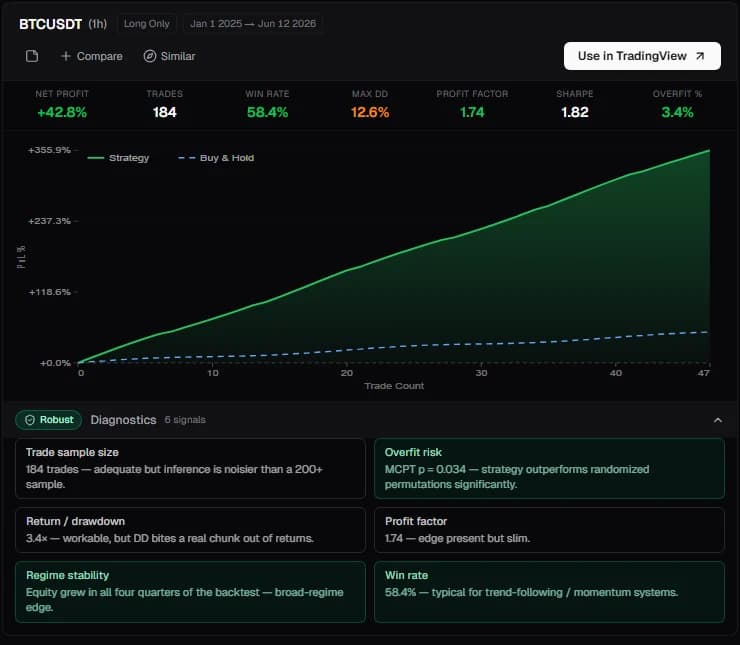
The diagnostics panel helps you look beyond a headline return number. It surfaces checks such as robustness, overfit risk, trade sample size, return and drawdown context, regime stability, and win-rate quality. Those signals are designed to help answer a simple trader question: "Is this result worth more attention, or is it fragile?"
This does not make any strategy ready for live capital by itself. It gives you a better filter before you decide what to compare, save, share, or move into TradingView for forward-testing.
TradingView handoff is now the main strategy action
When a strategy is ready for chart-level testing, Atlas makes the TradingView handoff clearer.
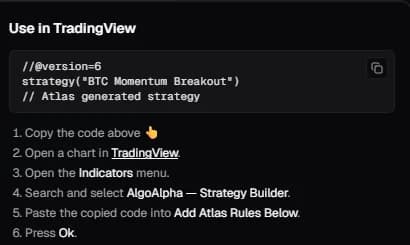
The handoff flow gives traders a copyable strategy block and step-by-step instructions for using it with the TradingView workflow. This keeps Atlas focused on discovery and review, while TradingView remains the place to test the setup on your own chart and watch how it behaves outside the original search.
The surrounding strategy controls still support the research loop: notes, compare, find similar, sharing, and quality insights. The difference is that the main path is clearer. Find the candidate in Atlas, inspect the diagnostics, compare it if needed, then move it toward TradingView when it deserves deeper testing.
Smarter prompts and filters reduce research friction
Beyond the visible sharing, comparison, diagnostics, and TradingView handoff surfaces above, Atlas also has more workflow controls for shaping a search before you commit to a direction.
The latest prompt and filtering improvements include:
- Skeptical mode for more critical review of strategy candidates.
- Saved searches for research patterns you expect to reuse.
- Default and soft filters to steer results without making every constraint absolute.
- Cost preview before running a request.
- Prompt recall for returning to earlier phrasing.
- Slash commands and help affordances for faster navigation.
- Keyboard shortcuts for moving through the workspace faster.
These are productivity upgrades, but they matter most during longer sessions. When you are testing several versions of the same thesis, small controls like saved searches and prompt recall keep you from wasting time reconstructing a good query.
Better organization for longer Atlas sessions
Strategy research often turns into a branching process: one prompt leads to a variant, a filter change, a note, a comparison, and then a new question. Atlas now gives that broader workflow more structure.
Saved searches help preserve recurring prompts. The soft-filter editor lets you tune default preferences without forcing every search into a rigid box. Notes give you a place to capture why a setup looked promising, risky, or worth revisiting. Account and session controls make the workspace easier to manage when an Atlas session runs longer than a quick one-off search.
Model selection and upgrade actions are also closer to the product flow, so traders can choose the level of model support they want. Chat cleanup is guarded too: the delete-all-chats control requires confirmation, which helps prevent accidental loss of research history.
Backtests now have a more useful review frame
Atlas backtest presentation has been tightened in two practical ways.
First, equity charts show the full backtest data window, which gives a better view of how a strategy behaved across the tested period. That helps separate steady performance from results driven by one narrow burst.
Second, Atlas uses a more realistic commission assumption for strategy testing: 0.1% per side. This is a user-facing realism improvement. It gives traders a more grounded starting point when deciding whether a strategy deserves comparison, sharing, or TradingView forward-testing.
Backtests still need judgment. Commission, sample size, regime behavior, and forward performance all matter. The update simply makes the evidence easier to interpret before you spend more time on a candidate.
A practical workflow with the new Atlas features
Here is one way to use the updated Atlas workflow:
- Start from Atlas and describe the market, timeframe, direction, and strategy style you want to investigate.
- Use saved searches, soft filters, or skeptical mode if you already know how you want Atlas to narrow the search.
- Review strategy diagnostics before trusting the headline result.
- Compare your strongest candidates instead of choosing from one metric.
- Ask Atlas a follow-up about the comparison.
- Share the chat or strategy preview if another trader should review or continue the research.
- Use the TradingView handoff when a strategy deserves chart-level testing.
For adjacent workflows, see the saved strategies dashboard update and the Atlas plus Strategy Builder update.
FAQ
What is new in Atlas?
Atlas now includes shareable chats and strategies, compare mode, strategy-quality diagnostics, a clearer TradingView handoff, smarter prompts and filters, saved searches, model/account controls, guarded chat deletion, and better backtest presentation.
Can I share an Atlas strategy or conversation?
Yes. Atlas supports public preview links for chats and strategies. A recipient can review the shared context and continue the conversation by forking it into their own Atlas session.
What does Atlas compare mode show?
Compare mode shows two strategy candidates with overlaid equity curves, side-by-side metrics, best-value highlighting, and an Ask Atlas action for follow-up analysis.
What do Atlas strategy diagnostics help with?
Strategy diagnostics help traders evaluate quality signals such as robustness, overfit risk, trade sample size, return and drawdown context, regime stability, and win-rate quality before deciding whether a backtest deserves deeper review.
Why does the 0.1% per-side commission assumption matter?
Commission affects whether a backtest is realistic enough to investigate. A 0.1% per-side assumption gives traders a more grounded first read before comparing, sharing, or forward-testing a strategy.
Try the updated Atlas workflow
The newest Atlas updates are built around a practical research loop: search, inspect diagnostics, compare, ask a follow-up, share the context, and move the best candidate toward TradingView.
Open Atlas and run a strategy search worth comparing.
Do this automatically
Atlas finds strategies with real backtests behind them, so you don't have to test every idea by hand.